Tuck End Packaging Box Design Editable
Packaging is often the first physical interaction a consumer has with a brand. It is not merely a container; it is a silent salesperson, a tactile experience, and a crucial component of your brand identity. For designers, entrepreneurs, and small business owners looking to elevate their product presentation, the difference between a generic box and a premium package lies in the details. This is where professional-grade design assets become indispensable. The Tuck End Packaging Box Design Editable template offers a robust solution for creating high-quality, print-ready beauty cream packaging that stands out on crowded shelves.
This resource is specifically tailored for the beauty and cosmetics industry, focusing on the classic yet versatile reverse tuck end (RTE) box structure. By providing editable vector files alongside precise dielines and 3D mockups, this design asset bridges the gap between conceptual creativity and manufacturing reality. Whether you are launching a new skincare line or refreshing an existing brand, having access to a structured, professional foundation allows you to focus on aesthetics and messaging rather than struggling with technical file preparation.
The Anatomy of a Professional Beauty Package
Understanding the structure of the packaging is the first step toward mastering its design. The reverse tuck end box is a staple in cosmetic packaging for good reason. It features a top flap that tucks into the front panel and a bottom flap that tucks into the back panel, creating a secure closure without the need for glue or tape. This structure is ideal for jars, tubes, and compacts, offering a clean, unbroken surface area for your graphics.
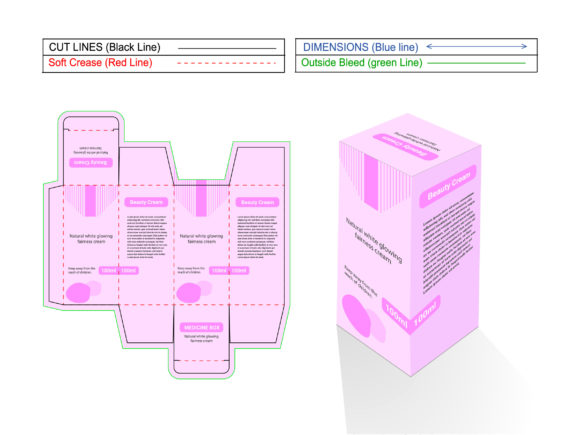
The Tuck End Packaging Box Design Editable template comes with a perfect dieline. In the world of print production, a dieline is a two-dimensional layout that indicates where the material should be cut, folded, and glued. Getting the dieline right is critical. A poorly constructed dieline can result in misaligned flaps, awkward seams, or even structural failure during shipping. This template ensures that your design aligns perfectly with the physical constraints of the box, saving you from costly printing errors and reprints.
Visually, the template is designed to support a wide range of aesthetic directions. It provides a neutral canvas that can accommodate minimalist modern typography, elegant script fonts, or bold graphic elements. The included 3D box view allows you to visualize how your design wraps around the structure before committing to print. This preview capability is invaluable for checking visual hierarchy, ensuring that key information like the product name, ingredients, and branding logo are positioned correctly when the box is assembled.
Why Editable Vector Files Matter
One of the most significant advantages of this design asset is the inclusion of editable vector formats, including EPS, AI, and SVG. Unlike raster images such as JPEGs, which are made up of pixels and lose quality when scaled, vector files are mathematically defined. This means you can resize your design elements—from tiny ingredient text to large background patterns—without any loss of sharpness or clarity. For packaging, where precision is paramount, this flexibility is non-negotiable.
The ability to edit these files directly in industry-standard software like Adobe Illustrator empowers designers to customize every aspect of the package. You can adjust colors to match your specific brand palette, modify typography to suit your voice, and rearrange layout elements to highlight different features of your product. This level of control ensures that the final output is not just a template fill-in, but a unique expression of your brand identity.
Furthermore, the availability of SVG files makes this template accessible beyond traditional print workflows. Scalable Vector Graphics can be easily integrated into digital marketing materials, social media graphics, and web design projects. If you are running a digital ad campaign for your new cream, you can use the same design elements from the packaging to create cohesive social media posts, email headers, and website banners. This consistency strengthens brand recognition and creates a seamless user experience across all touchpoints.
Enhancing Brand Perception Through Design
In the beauty industry, perception is everything. Consumers often judge the quality of a product by its packaging. A well-designed box signals professionalism, attention to detail, and value. The Tuck End Packaging Box Design Editable helps you achieve this high-end look by providing a clean, structured framework. When your design adheres to proper print standards, with correct bleed areas, safe zones, and resolution settings, the final product looks polished and credible.
Typography plays a huge role in this perception. The template encourages thoughtful font pairing. For instance, you might pair a sophisticated serif font for the product name with a clean sans-serif font for the descriptive text. This combination creates visual interest while maintaining readability. The included JPEG preview image allows you to see how these typographic choices look in context, helping you refine the balance between style and function.
Moreover, the template supports various creative styles. If your brand leans towards organic and natural, you can incorporate earthy tones and handwritten-style fonts. If your brand is more clinical and scientific, you might opt for stark whites, minimal lines, and geometric sans-serifs. The versatility of the editable files ensures that you can adapt the design to fit any brand personality, making it a valuable tool for diverse market segments.
Practical Steps for Implementation
To get the most out of this design asset, start by reviewing the included documentation and dieline specifications. Ensure you understand the dimensions and fold lines before placing any content. It is wise to test your design by exporting a low-resolution PDF and printing it out on regular paper. Cut and fold the paper model to check for fit and alignment. This simple step can reveal potential issues with text placement or graphic scaling that might not be obvious on screen.
When designing, keep readability in mind. Cosmetic labels often contain a lot of information, including ingredient lists, usage instructions, and regulatory statements. Use hierarchy to guide the eye: make the brand name and product type prominent, followed by key benefits, and then the finer details. Avoid cluttering the design with too many competing elements. White space is your friend; it gives the design room to breathe and enhances the perceived luxury of the product.
Finally, always verify color modes. Print requires CMYK color profiles, while digital screens use RGB. The editable vector files allow you to convert and adjust colors accurately for print. Working with a reliable printer who understands packaging requirements will also ensure that your colors translate faithfully from screen to box. By combining the technical precision of the Tuck End Packaging Box Design Editable with thoughtful creative direction, you can create packaging that not only protects your product but also captivates your audience.