Poster Mockup for Professional Design
In the fast-paced world of visual communication, presenting your work is just as critical as the design itself. A beautifully crafted poster can fall flat if it is displayed in a sterile, two-dimensional void that fails to convey scale, texture, or context. This is where a high-quality Poster Mockup becomes an indispensable tool for any creative professional. It bridges the gap between a digital file and a tangible reality, allowing you to showcase your designs in a realistic 3D display that resonates with clients and audiences alike.
This specific asset is designed to streamline your workflow while elevating the presentation of your portfolio, client proposals, or social media content. Available in PSD Photoshop format, it leverages smart-object features to help you replace current designs with your own within seconds. Whether you are a freelance graphic designer, a marketing agency owner, or a hobbyist looking to share your art, understanding how to utilize this mockup effectively can transform the way you communicate your creative vision.
The Power of Realistic Presentation
Why does realism matter in design presentation? When potential clients or employers view your work, they are not just evaluating colors and typography; they are imagining the final product in the real world. A flat image on a white background lacks depth. It does not show how light interacts with paper, how the poster might hang on a wall, or how it fits into a physical environment. By using a Poster Mockup, you provide that missing context.
The ability to present your work in a three-dimensional space builds trust. It signals professionalism and attention to detail. For educators and publishers, it helps students visualize their projects before printing. For entrepreneurs and small business owners, it allows for better pre-launch marketing by showing customers exactly what the final promotional material will look like. This level of clarity reduces uncertainty and accelerates decision-making processes.
Technical Features That Enhance Workflow
Efficiency is key in the creative industry. You do not want to spend hours manually masking images or adjusting shadows when you could be designing new concepts. This item addresses those pain points through several robust technical features:
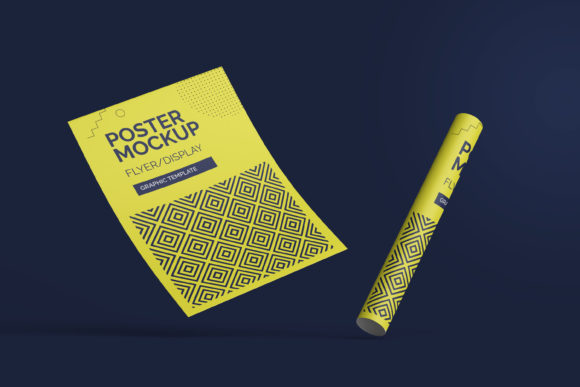
- Smart-Object Integration: The core functionality relies on Photoshop’s smart-object technology. This means you can double-click the designated layer, drop in your new artwork, save, and watch the mockup update instantly. The perspective, lighting, and shadows adjust automatically to match your design’s dimensions.
- High Resolution (300 DPI): With a size of 3000x2000 pixels, this mockup offers sufficient resolution for both screen-based presentations and high-quality print outputs. This ensures that your details remain crisp whether viewed on a mobile device or projected in a meeting room.
- Changeable Background Color: Context matters. Sometimes a clean white background highlights the design best, while other times a textured gray or deep black adds drama. The flexibility to change the background color allows you to tailor the mood of the presentation to suit different brand identities.
- PDF Help Guide: Included with the download is a PDF guide. This resource is invaluable for users who may be less familiar with advanced Photoshop techniques. It provides step-by-step instructions, ensuring that even beginners can achieve professional results without frustration.
Creative Applications and Use Cases
While the primary function of a Poster Mockup is to display posters, its utility extends across various creative disciplines. Here is how different professionals can adapt this tool for their specific goals:
For Graphic Designers and Freelancers
Your portfolio is your resume. Instead of uploading flat JPEGs of your work, use this mockup to create case studies. Show how a concert poster looks hanging in a venue lobby, or how a corporate event flyer appears on a reception desk. This narrative approach helps clients understand the versatility of your skills. You can also use these visuals to pitch ideas to clients before committing to production costs, making the sales process smoother.
For Marketers and Small Business Owners
Marketing materials need to grab attention quickly. If you are launching a new product or service, creating a mockup of the promotional poster in a realistic setting can be used in social media ads or email campaigns. A realistic preview increases engagement rates because viewers can relate to the scenario. For example, a restaurant owner can show how a dinner special poster would look framed in their dining area, helping staff and customers visualize the offer immediately.
For Educators and Students
In academic settings, visualization aids learning. Instructors can use this mockup to demonstrate proper layout principles, such as hierarchy and balance, in a real-world context. Students can submit their assignments not just as files, but as presented works, fostering a sense of pride and professionalism in their craft. It teaches them the importance of presentation, a soft skill often overlooked in technical courses.
For Bloggers and Content Creators
If you run a blog about design tips, DIY home decor, or event planning, this mockup serves as excellent content fodder. You can create tutorials on "How to Create Eye-Catching Event Posters" and use the mockup to illustrate your points. The variety of styles achievable through background changes and different poster sizes keeps your content fresh and visually engaging.
Tips for Effective Usage
To get the most out of this Poster Mockup, keep a few practical considerations in mind. First, always ensure your source design matches the aspect ratio of the mockup. While smart objects handle scaling, starting with a correctly proportioned file prevents distortion or awkward cropping.
Secondly, pay attention to lighting consistency. If your mockup features strong directional light, avoid placing extremely dark designs that absorb all light unless that is the intended artistic effect. Conversely, very bright designs might appear washed out if the mockup has heavy shadows. Adjusting the brightness and contrast of your inserted design slightly can help it blend more naturally into the scene.
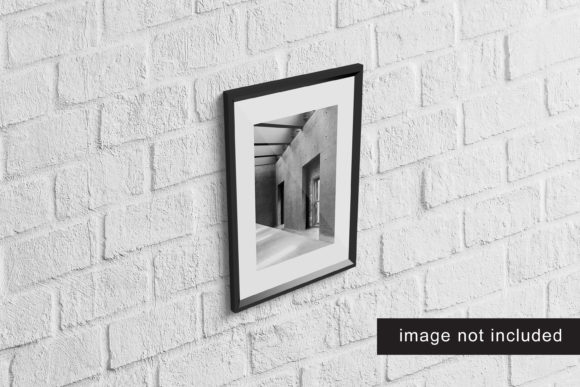
Finally, remember that the photos used in previews are for illustration purposes only. Do not assume the exact environmental textures are included unless specified. Focus on the poster itself. Keep your composition clear and organized. A cluttered design will look messy regardless of how good the mockup is. Use negative space effectively, choose legible fonts, and ensure your call-to-action is prominent.
Conclusion
Investing in a high-quality Poster Mockup is an investment in your professional image. It saves time through smart-object automation, enhances clarity through realistic 3D displays, and boosts credibility by presenting your work in a polished manner. Whether you are showcasing a bold artistic statement or a subtle corporate message, this tool empowers you to present your ideas with confidence. By leveraging the provided features—such as the changeable backgrounds and high-resolution output—you can create compelling visual stories that connect with your audience and drive results. Start experimenting with different styles and contexts today to see how a realistic presentation can elevate your creative projects.