Tablet Right Side View Mockup
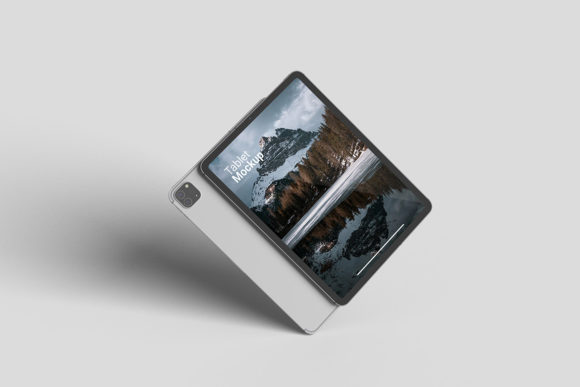
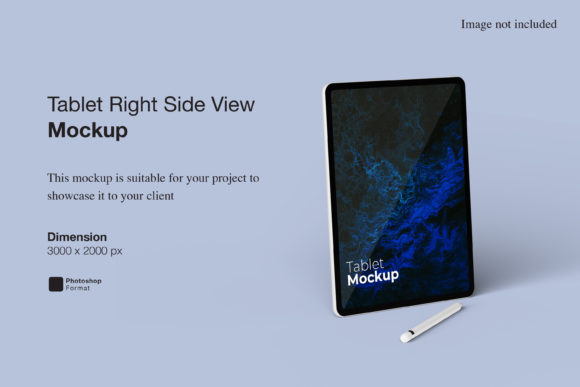
Presenting digital designs on a physical device is one of the most effective ways to communicate value. When you are showcasing an app interface, a website layout, or a digital illustration, the context in which it is viewed matters just as much as the design itself. A Tablet Right Side View Mockup provides a specific, realistic perspective that allows creators to display their work in a way that feels tangible and professional. This particular angle—showing the tablet from the right side—offers a dynamic composition that breaks away from the standard straight-on front view, adding depth and visual interest to your portfolio or marketing materials.
The core utility of this mockup lies in its practicality. It is delivered in PSD Photoshop format, utilizing smart-object technology to streamline the workflow. Instead of manually masking, warping, and blending your design onto a device screen, you can simply double-click the smart object layer, paste your artwork, and save. The software handles the rest, ensuring your design fits perfectly within the screen boundaries with accurate lighting and reflections. This feature alone transforms what could be a tedious hour-long task into a matter of seconds, making it an invaluable asset for anyone who needs to produce high-quality visuals regularly.
Why Perspective Matters in Design Presentation
In the world of visual communication, a flat image often fails to convey the full potential of a product. A right-side view introduces dimensionality. It suggests that the device exists in a real space, resting on a surface, perhaps near a coffee cup or under soft natural light. This realism helps the viewer imagine themselves using the product. For a designer, this means the focus shifts from "how does this look on a screen?" to "how does this feel in the hand?"
The 3000x2000 pixel resolution at 300 dpi ensures that even when printed for large-format displays or zoomed in closely on high-resolution screens, the image remains crisp and clear. There is no pixelation, no blurring, and no loss of detail. This level of quality is non-negotiable for professionals who need their presentations to reflect the same attention to detail as their actual design work. A low-resolution mockup can inadvertently signal carelessness, whereas a sharp, realistic render builds trust and credibility.
Ease of Use for Beginners and Non-Designers
Not everyone working with these mockups is a seasoned graphic designer. Many users are marketers, small business owners, or content creators who may have limited experience with Adobe Photoshop. For these individuals, the learning curve can be intimidating. However, the inclusion of a PDF help guide and the intuitive nature of smart objects significantly lowers the barrier to entry.
Beginners benefit from the guided process. The smart-object feature acts as a safety net; it prevents common mistakes like stretching images incorrectly or misaligning text. If you are new to digital presentation tools, this mockup allows you to achieve professional results without needing to master complex layer styles or blending modes. You can focus on the creative aspect of your design rather than the technical mechanics of compositing. This accessibility makes it suitable for freelancers and hobbyists who want to elevate their branding but lack advanced software skills.
Efficiency for Professionals and Agencies
For experienced designers and agency teams, time is the most valuable resource. When pitching to clients or preparing case studies, speed and consistency are paramount. A Tablet Right Side View Mockup enables rapid iteration. You can generate multiple variations of a campaign by simply swapping out the screen content while maintaining a consistent visual style across all assets.
Professionals also appreciate the flexibility offered by the changeable background color. Whether you need a clean white background for a minimalist aesthetic, a dark tone for a sleek tech vibe, or a textured surface for a lifestyle feel, you can adjust the backdrop instantly. This versatility allows for cohesive brand storytelling across different platforms, from social media posts to client decks. The ability to quickly adapt the mockup to fit various brand guidelines reduces the friction in the design approval process.
Creative Flexibility for Educators and Publishers
Educators and publishers often use mockups to demonstrate how educational content or e-books will appear on modern devices. A right-side view can be particularly effective in instructional materials because it shows the form factor of the tablet clearly. It helps students visualize the reading experience or the interactive elements of a digital textbook.
Publishers might use these visuals in pitch documents to agents or investors. Showing a book cover or a magazine layout on a tablet in a realistic setting makes the digital product feel more concrete and market-ready. The high fidelity of the mockup supports the narrative that the digital edition is a premium offering, not just a simple PDF conversion. This subtle psychological cue can influence decision-makers and highlight the commercial value of digital publishing initiatives.
Commercial Value for Marketers and Entrepreneurs
Marketing campaigns rely heavily on visual appeal to capture attention. In a crowded digital landscape, standing out requires more than just good copy; it requires compelling imagery. Using a realistic mockup in advertisements, landing pages, or email newsletters can increase engagement rates by providing a relatable context for the viewer.
Entrepreneurs launching a new app or service can use this mockup in pre-launch teasers. By showing the interface on a tablet, they signal that their product is optimized for larger screens, appealing to users who prefer productivity-focused devices. This strategic presentation can enhance perceived value and justify premium pricing. Furthermore, the ease of updating the mockup means that marketing materials can stay current with frequent app updates without requiring constant re-shoots or redesigns.
Evaluating Your Needs
When deciding whether a Tablet Right Side View Mockup is the right tool for your project, consider your primary goals. If you prioritize speed and simplicity, the smart-object functionality is a major advantage. If you require high print quality, the 300 dpi resolution ensures your output meets professional standards. If you need versatility, the customizable background and realistic 3D rendering offer the flexibility to adapt to various contexts.
- Check your skill level: Are you comfortable with basic Photoshop operations? If so, this mockup will save you significant time.
- Assess your output needs: Do you need web-ready images or high-res prints? The provided dimensions support both.
- Consider your audience: Will your viewers respond better to a clean, direct view or a dynamic, angled perspective?
It is important to note that the photos used in preview images are for illustration purposes only and are not included in the download. This means you have the freedom to create your own unique environments and lighting setups if desired, or stick to the provided clean backgrounds. This separation allows for greater customization without the clutter of pre-existing props.
Ultimately, the choice between different mockup angles comes down to the story you want to tell. A right-side view offers a sophisticated, slightly informal look that can make your designs feel approachable yet polished. Whether you are a beginner looking to present your first portfolio piece or a seasoned pro preparing a client pitch, this tool provides the reliability and quality needed to showcase your work effectively. By leveraging smart objects and high-resolution assets, you can ensure that your digital creations receive the professional presentation they deserve.