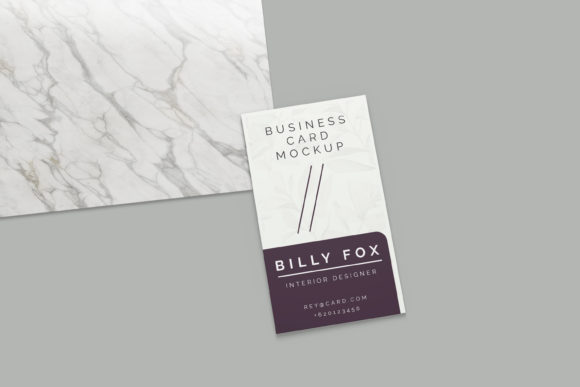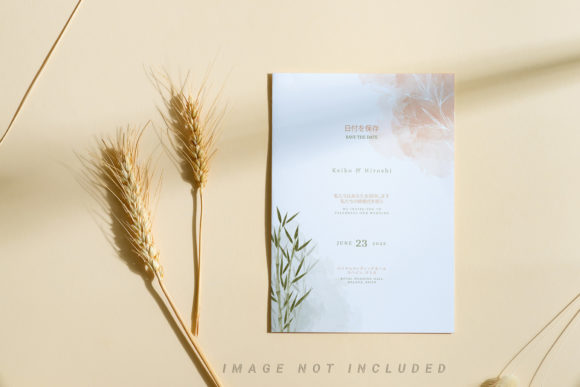
Paper Beige Card Mockup
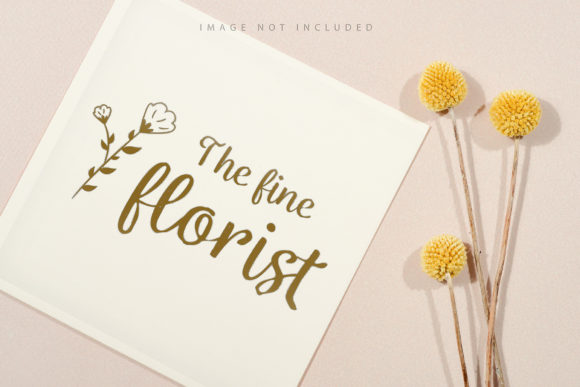
In the world of digital design, presenting an idea is often just as critical as the idea itself. Whether you are a freelancer pitching a brand identity to a client or a small business owner preparing social media assets for a product launch, the visual context matters immensely. This is where Paper Beige Card Mockup becomes an essential tool in your workflow. It is not merely a template; it is a bridge between a flat digital file and a tangible, realistic presentation that resonates with viewers.
The core functionality of this mockup relies on Adobe Photoshop’s smart object technology. The process is streamlined for efficiency: you simply paste your design into the designated smart object layer and save the changes. The software handles the rest, warping and lighting your graphic to fit the card’s perspective seamlessly. However, the true value lies in the thoughtful details built into the file structure, specifically the inclusion of a safety zone. This feature ensures that your content remains legible and aesthetically pleasing, regardless of the composition.
Understanding the Technical Foundation
Before diving into specific use cases, it is helpful to understand what makes this asset distinct from generic templates. The file is provided in a high-quality PSD format at 6016×4016 pixels with a resolution of 300 DPI. For print designers and those creating high-resolution web graphics, this clarity is non-negotiable. It ensures that text remains crisp and images do not pixelate when scaled or printed.
A defining characteristic of this mockup is its nature as a photograph rather than a 3D render or vector illustration. This distinction is crucial for designers who prioritize realism. Photorealistic mockups capture subtle imperfections—such as paper texture, slight shadows, and natural lighting variations—that 3D renders sometimes struggle to replicate authentically without extensive post-processing. Furthermore, because it is a static photo, the background color and environmental lighting remain constant. This stability allows you to focus entirely on your typography and layout without worrying about the environment shifting unpredictably.
Why Different Audiences Value Realism
The appeal of a beige card mockup varies significantly depending on who is holding the mouse. For different professionals, the same tool solves different problems.
For Beginners and Hobbyists
If you are just starting your journey in graphic design, the learning curve can be steep. Navigating complex layers and blending modes can be intimidating. The Paper Beige Card Mockup simplifies this by offering a "drop-in" solution. The documentation included with the file guides users through the basic steps of activating the smart object layer. For hobbyists designing birthday cards, invitations, or personal blogs, the ease of use is the primary benefit. You do not need advanced skills to achieve a professional look; you only need to place your image and save. This immediate gratification encourages creativity and helps new designers build a portfolio quickly.
For Freelancers and Creative Professionals
Time is money for freelancers. When submitting proposals or final deliverables, presentation speed is vital. A designer might have twenty clients waiting for revisions. Using a standardized, high-quality mockup allows for rapid iteration. Instead of building a scene from scratch for every project, the professional can swap out designs in seconds. The inclusion of a safety zone is particularly valuable here. It prevents the common mistake of placing important logos or text too close to the edges, which could result in awkward cropping during printing. This reliability reduces stress and minimizes the risk of client rejection due to poor formatting.
For Marketers and Small Business Owners
Marketing is about perception. When launching a new business card, loyalty card, or greeting card line, the goal is to help customers visualize the physical product. A beige card mockup provides a neutral, elegant backdrop that lets the design speak for itself. Unlike colorful or busy backgrounds that can distract from the message, the soft tone of beige offers a sophisticated contrast. For entrepreneurs, this means higher conversion rates on e-commerce sites where customers cannot physically touch the product. The realistic texture builds trust and reduces the cognitive load required to imagine the final item.
The Importance of the Safety Zone
One of the most practical features mentioned in the product description is the safety zone. In design terminology, this refers to the area within the smart object where content should ideally reside to avoid being cut off or distorted. The mockup includes visible guide lines that delineate this safe area.
Why does this matter? Consider a logo placed near the edge of a card. If the card is folded, trimmed, or viewed at an angle, elements outside the safety zone may become obscured or visually unbalanced. By adhering to these guidelines, designers ensure consistency across all their projects. It acts as a quality control measure, embedding best practices directly into the template. For educators teaching design principles, this feature serves as a practical lesson in composition and negative space management.
Evaluating Quality and Long-Term Usefulness
When selecting digital assets, longevity is key. A mockup that looks good today might feel dated tomorrow if it lacks versatility. The Paper Beige Card Mockup leans into minimalism, a timeless aesthetic. Beige is a neutral earth tone that pairs well with almost any color palette, from vibrant corporate branding to muted pastel schemes. This flexibility means the asset can be used across multiple campaigns, seasons, and industries without losing relevance.
Additionally, the high resolution (300 DPI) ensures that the file remains useful for both digital and print applications. As businesses increasingly move toward omnichannel marketing, having assets that work equally well on Instagram feeds and in printed brochures is a significant advantage. The fact that the file is a photo rather than a vector also means it will render consistently across different devices and browsers, reducing technical glitches for end-users viewing the designs online.
Practical Application Examples
- Brand Identity Presentations: A branding agency uses the mockup to display a new logo on a business card. The realistic paper texture adds weight and importance to the presentation, making the client feel the quality of the proposed stationery.
- Social Media Content: An influencer creates a series of quote cards for Instagram. By using the smart object feature, they can batch-process dozens of designs, ensuring a cohesive and professional feed appearance in a fraction of the time.
- E-commerce Listings: A stationery shop sells handmade notebooks. They use the mockup to show potential buyers how their custom covers would look on a standard card format, enhancing the shopping experience.
- Portfolio Building: A student includes several examples of their typographic experiments on the beige card. The neutral background ensures that the focus remains on their font choices and spacing techniques, demonstrating their skill clearly.
Conclusion
The Paper Beige Card Mockup is more than just a decorative frame; it is a functional tool designed to elevate the presentation of digital designs. Its combination of high-resolution photography, user-friendly smart objects, and practical safety zones makes it suitable for a wide range of users. Whether you are looking to save time, improve your design accuracy, or create more compelling visual content, this asset offers a reliable solution. By understanding how different audiences—from beginners to seasoned pros—can leverage its features, you can determine if it aligns with your specific creative goals. Ultimately, it empowers you to present your work with confidence, clarity, and professionalism.