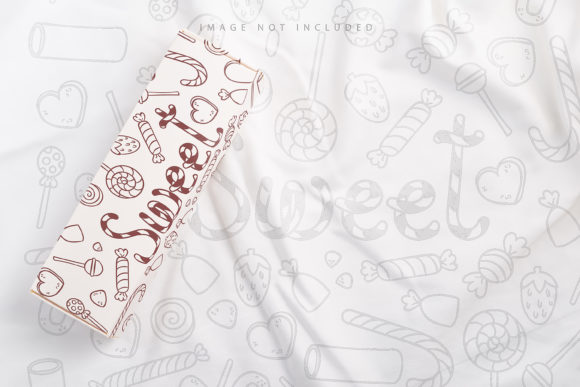
White Craft Box Mock Up on Textile
Presenting a product effectively is often the difference between a casual browser and a committed buyer. When you are launching a new brand, updating your online store, or creating social media content for a small business, visual appeal matters immensely. This is where realistic product visualization comes into play. The White Craft Box Mock Up on Textile offers a sophisticated yet accessible solution for designers, marketers, and entrepreneurs who want to showcase their packaging designs in a natural, high-quality environment.
Unlike generic templates that can feel sterile or overly digital, this specific mockup places a clean white craft box against a textured textile background. The contrast between the smooth, matte finish of the box and the organic weave of the fabric creates a visually pleasing composition that draws the eye. It provides a neutral canvas that allows your branding, typography, and logo to take center stage without distraction. Whether you are selling handmade goods, organic products, or premium retail items, this setup helps communicate quality and attention to detail before the customer even sees the physical product.
How Smart Objects Simplify Your Workflow
One of the most significant advantages of using modern PSD mockups is the integration of smart object technology. If you have ever struggled with manually warping images or trying to match perspective angles in photo editing software, you will appreciate how streamlined this process becomes. With this file, you do not need advanced graphic design skills to achieve professional results. The workflow is designed to be intuitive and efficient.
To get started, you simply open the provided .psd file in Adobe Photoshop. Inside, you will find an active smart object layer. This layer acts as a container for your design. All you need to do is double-click the smart object thumbnail to open it in a separate window. Here, you can paste your flat design—be it a label, a full wrap-around print, or a simple logo—and save the file. Once you close and save that window, your design automatically maps onto the box in the main document, perfectly conforming to the lighting, shadows, and perspective of the original photograph.
This method ensures that your artwork looks realistic because it inherits the natural lighting conditions of the scene. There is no manual distortion required, which eliminates common errors like stretched text or misaligned edges. It is a feature that saves time and reduces frustration, allowing you to focus on the creative aspect of your branding rather than the technical mechanics of image manipulation.
The Importance of Safety Zones
A critical feature included in this mockup is the dedicated safety zone. For those unfamiliar with packaging design, a safety zone refers to the area within a design where essential elements—such as barcodes, logos, and legal text—must remain. These elements should never be placed too close to the edges or corners of a package, as they might get cut off during manufacturing or obscured by folding seams.
In this PSD file, the safety zone is clearly marked with guide lines. By activating the specific layer containing these guides, you can see exactly where it is safe to place your content. This feature is incredibly convenient for placing objects accurately. It prevents the common mistake of designing something that looks perfect on screen but fails in production. By adhering to these boundaries, you ensure that your final printed product will look polished and professional. It serves as a practical educational tool for beginners while providing a reliable reference for experienced designers.
High-Quality Resolution and Realistic Texture
Visual fidelity is paramount when presenting products online. This mockup boasts a resolution of 6016×4016 pixels at 300 DPI. This high definition means that whether you are displaying the image on a large desktop monitor, printing it for a trade show banner, or using it in a high-resolution email newsletter, the details will remain crisp and clear. You will be able to see the subtle textures of the paper and the fabric, adding a tactile sense to the digital image.
It is important to note that this is a photograph, not a 3D render or vector illustration. While 3D models offer flexibility, they sometimes lack the nuanced imperfections and lighting interactions found in real-life photography. This photo-based approach captures the authentic way light hits a white cardboard surface and casts soft shadows on the textile underneath. This realism builds trust with potential customers, as it closely resembles what they would receive in the mail.
Practical Applications Across Industries
The versatility of the White Craft Box Mock Up on Textile makes it suitable for a wide range of industries and use cases. Small business owners in the food industry can use it to showcase cookie boxes, spice blends, or artisanal chocolates. Beauty and skincare brands can utilize the clean aesthetic to present serum bottles or soap bars nestled inside the box. Educators and hobbyists might use it to demonstrate packaging concepts for school projects or personal crafts.
For bloggers and content creators, this mockup provides ready-made assets for review posts, unboxing videos, or promotional graphics. Marketers can quickly generate multiple variations of ad creatives by swapping out different color schemes or logo placements, all while maintaining a consistent, high-end look. Because the background texture remains constant, you can create a cohesive brand identity across various marketing channels without the visual clutter of changing environments.
Important Considerations for Users
While this tool is powerful, there are a few key points to keep in mind to get the best results. First, the background color and the textile texture are fixed. The mockup does not allow you to change the color of the fabric or the lighting environment; it relies on the existing photographic base. Therefore, your design choices should complement the neutral tones of the white box and the underlying material.
Additionally, please remember that any typography shown in the preview images is NOT INCLUDED. You must supply your own text and layout. The mockup only provides the structure of the box and the realistic rendering engine via the smart object. Also, since this is a photo-based template, the shadows and highlights are baked into the image. You cannot easily adjust the direction of the light source after applying your design. This means you should choose a mockup angle that matches the lighting style of your other marketing materials to maintain consistency.
Getting Started with Your Design
Using this resource is straightforward once you understand its components. Ensure you have Adobe Photoshop installed, as the smart object functionality is native to this software. Open the documentation file included in the download to familiarize yourself with the layer structure. Identify the smart object layer and the safety zone guides. Prepare your design files in CMYK or RGB format, depending on your final output needs, keeping in mind that screen previews are typically RGB.
By leveraging the smart object features and respecting the safety zones, you can produce stunning visual presentations that elevate your brand perception. The combination of high-resolution imagery, realistic textures, and user-friendly tools makes this mockup an excellent investment for anyone looking to improve their product presentation. It bridges the gap between digital design and physical reality, helping you sell your vision more effectively. Thank you for considering this resource for your creative projects, and we hope it helps you bring your packaging ideas to life with clarity and professionalism.