Envelope Letter Mockup: A Professional Presentation Tool for Designers
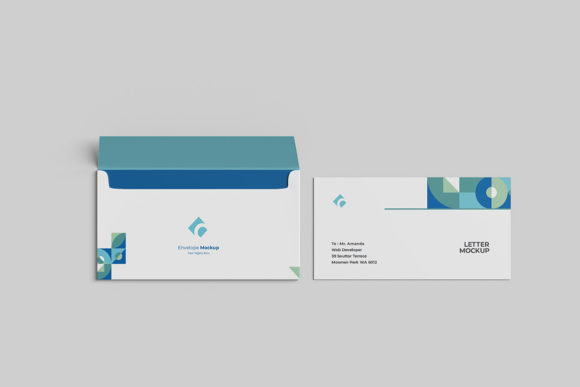
In the competitive world of graphic design and branding, how you present your work is just as critical as the work itself. Clients do not judge a book by its cover alone; they judge it by the context in which it is presented. This is where the Envelope Letter Mockup becomes an indispensable asset. Whether you are a freelance designer, a marketing agency, or a small business owner looking to showcase brand identity materials, this tool offers a realistic 3D display that elevates your portfolio from flat images to tangible realities.
The core value of this PSD file lies in its ability to bridge the gap between digital creation and physical perception. By providing a high-fidelity representation of an envelope and letter set, it allows creators to demonstrate their designs in a way that feels authentic and professional. This article explores the features, benefits, and practical applications of using an Envelope Letter Mockup to enhance your design presentations.
Why Presentation Matters in Design
Before diving into the technical specifications, it is important to understand why presentation templates are necessary. When a client receives a PDF or a JPEG of a logo or brochure layout, it can be difficult for them to visualize the final product. The scale, texture, and context are often lost in translation. A mockup solves this problem by placing your design onto a virtual object that mimics real-world materials.
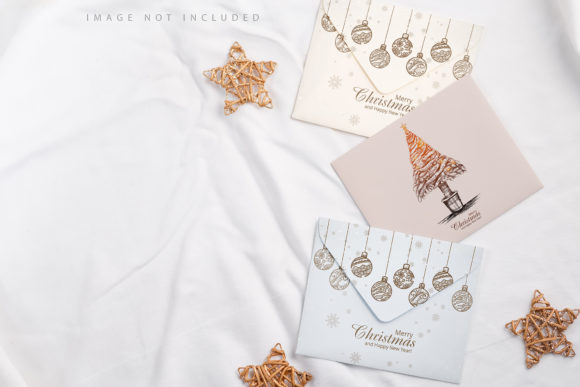
An Envelope Letter Mockup specifically targets stationery and correspondence projects. It allows you to show how a logo looks on a return address label, how a letterhead aligns with the paper grain, and how the overall branding feels when held in someone’s hand. This contextualization builds trust and helps clients make faster decisions because they can "see" the result before it is printed.
Key Features and Technical Specifications
The effectiveness of any mockup depends on its technical quality and ease of use. The Envelope Letter Mockup described here is engineered with both visual fidelity and user convenience in mind. Below are the defining characteristics that make it suitable for professional workflows.
- High-Resolution Output: The file is sized at 3000x2000 pixels with a resolution of 300 dpi. This ensures that when you export your final image for web use or print portfolios, the details remain crisp. There is no pixelation, even when zooming in on the texture of the paper or the fold of the envelope.
- Smart-Object Technology: One of the most significant advantages of this tool is its compatibility with Adobe Photoshop’s Smart-Object features. This means you do not need to manually mask, warp, or distort your design to fit the perspective of the envelope. You simply double-click the smart-object layer, paste your design, save, and the software automatically maps it onto the surface with correct lighting and shadows.
- Changeable Background Color: Context matters. A white background might feel clinical, while a dark wood texture might feel premium. This mockup allows you to easily change the background color, enabling you to create multiple variations of the same presentation for different platforms (e.g., Instagram vs. LinkedIn) without needing to recreate the scene.
- User-Friendly Format: Available in PSD (Photoshop) format, this file is accessible to anyone with standard editing software. Additionally, a PDF help guide is included. For those who may be less familiar with advanced Photoshop techniques, this guide provides step-by-step instructions on how to utilize the smart-objects effectively.
Who Can Benefit from This Mockup?
While designers are the primary users, the utility of an Envelope Letter Mockup extends to various professionals and businesses.
Freelance Graphic Designers
For freelancers, time is money. Manually creating a realistic 3D envelope from scratch in 3D modeling software like Blender or Cinema 4D can take hours. Using this PSD template reduces that process to seconds. More importantly, it gives your proposals a polished look that justifies higher rates. When a client sees a beautifully rendered mockup, they perceive the designer as more meticulous and professional.
Branding Agencies
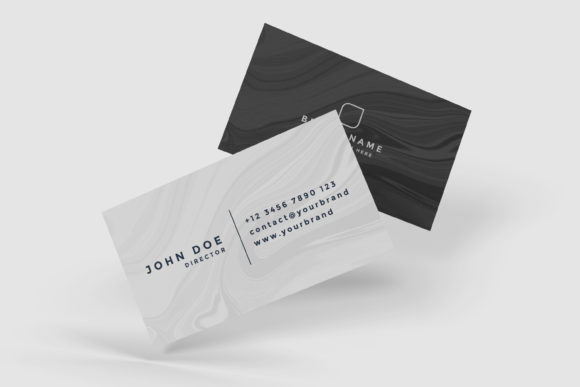
Agencies often deliver comprehensive brand guidelines that include stationery sets. Presenting these guidelines with a consistent, high-quality mockup reinforces the brand's attention to detail. It shows that the agency has thought about every touchpoint, from the business card to the letterhead.
Small Business Owners
Even if you are not a designer, you might be ordering custom stationery for your company. Before committing to a large print run, you can use this mockup to test how your chosen fonts and colors look on actual-looking paper. It serves as a low-cost proofing tool, helping you avoid expensive printing errors.
Online Sellers and Print-on-Demand Services
If you sell digital design assets or offer printing services online, this mockup is essential for your product listings. High-quality preview images increase conversion rates. Customers are more likely to purchase a design template if they can see exactly how it will look when used.
Practical Applications and Real-World Scenarios
To fully appreciate the versatility of the Envelope Letter Mockup, consider how it can be applied in different scenarios:
- Wedding Invitations: Show off intricate calligraphy and gold foil effects by placing them on a textured envelope. The realistic lighting in the mockup can simulate the shine of metallic ink.
- Corporate Rebranding: Demonstrate the new logo placement on a formal business letter. This helps stakeholders visualize the transition from old to new branding systems.
- Creative Portfolios: Include mockups in your personal portfolio website. They add visual variety and break up the monotony of flat grid layouts.
- Social Media Content: Use the changeable background feature to create eye-catching posts. A vibrant background color can make your design stand out in a crowded social media feed.
Evaluating Suitability and Limitations
While the Envelope Letter Mockup is a powerful tool, it is important to have realistic expectations. First, ensure that your version of Photoshop supports Smart-Objects, which is standard in CS6 and later versions. If you are using older software, you may encounter compatibility issues.
Secondly, remember that the photos used in previews are for illustration purposes only. The actual output will depend on the quality of the design you insert. A poorly designed logo will not look better just because it is placed in a high-quality mockup. The mockup enhances good design; it does not fix bad design.
Additionally, while the background color is changeable, the lighting and shadow directions are fixed based on the original 3D render. If your project requires a specific lighting angle that differs significantly from the mockup’s setup, you may need to adjust the exposure or contrast of your inserted design to match the ambient light.
How to Get Started
Integrating this mockup into your workflow is straightforward. After downloading the PSD file, open it in Adobe Photoshop. Locate the layer labeled with the Smart-Object icon. Double-click it to open a new tab containing your design canvas. Paste your artwork here, ensuring it fits within the safe areas indicated in the PDF guide. Save the changes (Ctrl+S or Cmd+S), close the tab, and watch as your design instantly wraps onto the envelope and letter.
Experiment with different background colors to find the one that best complements your brand palette. If you need to present the design in a different setting, duplicate the main group layer and modify the background layer. This flexibility allows you to create a cohesive visual story across multiple presentation slides or web pages.
Conclusion
The Envelope Letter Mockup is more than just a template; it is a communication tool. It translates abstract digital files into concrete visual experiences that clients can understand and appreciate. By leveraging its 3000x2000 px resolution, smart-object functionality, and customizable backgrounds, you can elevate your design presentations to a professional standard.
Whether you are showcasing a new brand identity, selling digital products, or simply wanting to improve your portfolio, this tool saves time and enhances credibility. In an industry where first impressions count, investing in high-quality presentation resources like this mockup is a strategic move that pays dividends in client satisfaction and project success.
Remember, the goal is not just to show what you designed, but to show how it will live in the real world. With the right tools, you can bring that vision to life with clarity and precision.