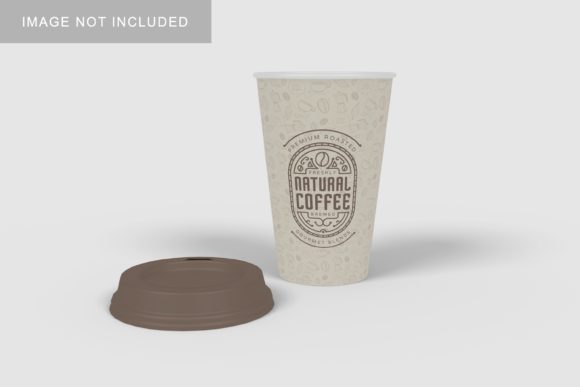
Coffee Cup Mockup V4
In the world of visual branding, the first impression is often the only one you get. Whether you are launching a new coffee blend, rebranding an existing line, or simply showcasing a creative label design to a client, the way your product is presented matters immensely. This is where Coffee Cup Mockup V4 steps in as a practical solution for designers and marketers who need to display their work professionally without the overhead of a physical photoshoot.
This resource is designed to bridge the gap between a flat digital file and a tangible, realistic product. By utilizing advanced smart-object technology within Photoshop, it allows users to replace current designs with their own artwork in seconds. The result is a high-fidelity 3D display that looks authentic, helping stakeholders visualize the final product before it ever hits the manufacturing floor.
What Is Coffee Cup Mockup V4?
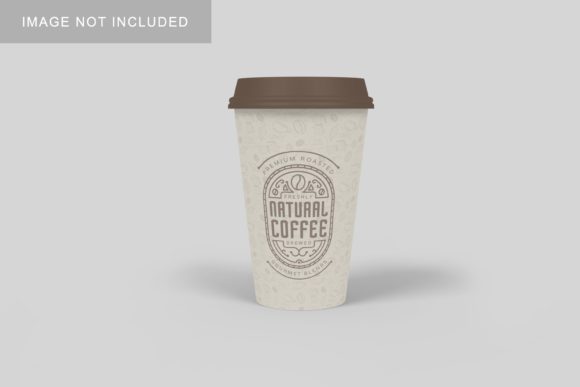
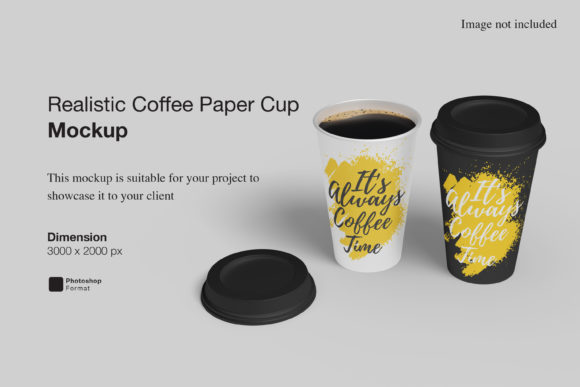
At its core, Coffee Cup Mockup V4 is a PSD (Photoshop) file engineered for efficiency and realism. It provides a standardized template where the primary focus is on the cup itself, rendered with realistic lighting, shadows, and textures. The file comes with a resolution of 3000x2000 pixels at 300 dpi, ensuring that the output is crisp enough for both web display and high-quality print materials.
The standout feature of this mockup is its integration of smart-objects. Unlike older methods that required complex layer masking or manual warping of images, this tool simplifies the process into a few clicks. You simply drag and drop your design onto the designated layer, and the software automatically maps it onto the curved surface of the cup, adjusting perspective and blending modes to match the lighting of the scene. Additionally, the mockup includes a changeable background color, offering flexibility to suit different brand aesthetics or marketing contexts.
Why Different Audiences Care About Realistic Presentation
Not everyone approaches product visualization with the same priorities. For some, speed is the most critical factor; for others, it is about cost-effectiveness or creative control. Understanding these nuances helps determine whether Coffee Cup Mockup V4 aligns with your specific workflow.
For Beginners and Hobbyists
If you are just starting out in graphic design or running a small home-based business, the barrier to entry can feel steep. Learning complex 3D modeling software like Blender or Cinema 4D takes time and resources. Coffee Cup Mockup V4 lowers this barrier significantly. Because it relies on familiar Photoshop interfaces and includes a PDF help guide, beginners can achieve professional-looking results without needing advanced technical skills. The ease of use allows hobbyists to experiment with different label designs quickly, fostering creativity without frustration.
For Freelancers and Agency Designers
Professionals working under tight deadlines value reliability and speed. When pitching a rebrand to a client, showing a static logo on a white background rarely conveys the full impact of the design. A realistic mockup tells a story. For freelancers, this tool offers a quick turnaround. Instead of spending hours rendering a 3D model from scratch, a designer can swap out five different color variations in minutes. This efficiency translates directly to billable hours and faster client approvals. The ability to present multiple options instantly can be the deciding factor in winning a contract.
For Marketers and Entrepreneurs
Marketing teams often need assets for social media campaigns, email newsletters, and e-commerce listings. High-quality visuals drive engagement, but hiring a photographer for every minor design tweak is cost-prohibitive. Coffee Cup Mockup V4 provides a scalable solution. Entrepreneurs can update their packaging designs digitally to test market reactions before committing to production runs. The changeable background feature is particularly useful here, allowing marketers to create cohesive visual themes across different platforms by matching the background color to their brand guidelines.
Evaluating Quality and Flexibility
When selecting a digital asset, quality cannot be compromised. A low-resolution or poorly lit mockup can make even the best design look amateurish. With a resolution of 3000x2000 pixels, Coffee Cup Mockup V4 ensures that fine details in typography and intricate graphic elements remain sharp. This level of detail is crucial for professionals who need to demonstrate precision to discerning clients.
Furthermore, the flexibility of the template adds long-term value. While many mockups are rigid, this one allows for background customization. This means you are not limited to a single aesthetic. You can place the coffee cup against a vibrant, energetic backdrop for a youth-oriented energy drink campaign, or use a neutral, minimalist background for a sophisticated artisanal roast. This versatility extends the lifespan of the purchase, making it a reusable asset rather than a one-time use file.
Practical Applications Across Industries
The utility of this mockup extends beyond just selling coffee. Here is how various groups might integrate it into their projects:
- Small Business Owners: Use it to create professional-looking product pages for Etsy, Shopify, or Amazon without investing in expensive photography equipment.
- Educators: In design classes, instructors can use this as a teaching aid to show students how digital designs translate to physical objects, emphasizing the importance of lighting and perspective in packaging.
- Publishers: Book cover designers or magazine editors working on lifestyle content can use similar techniques to visualize branded merchandise or promotional items associated with an article.
- Consumers: While consumers do not typically create mockups, understanding their existence helps them recognize the effort behind the polished images they see online, fostering a deeper appreciation for design craftsmanship.
Considerations for Implementation
While Coffee Cup Mockup V4 is a powerful tool, it is important to approach it with realistic expectations. The item is provided in PSD format, which requires Adobe Photoshop to utilize the smart-object features. If you do not have access to this software, alternative tools would be necessary. Additionally, while the preview images provide inspiration, they are for illustration purposes only. Users must supply their own designs to populate the mockup.
Another consideration is the learning curve associated with smart-objects. Although the included PDF guide simplifies the process, those completely unfamiliar with Photoshop may need a short period to get comfortable with the interface. However, the time invested in learning this skill pays off, as smart-object workflows are applicable to countless other design tasks, enhancing overall productivity.
Is It Right for You?
Determining if Coffee Cup Mockup V4 fits your needs depends on your balance of time, budget, and desired output quality. If you frequently need to present packaging designs, require high-resolution assets for print, or want to save money on photoshoots, this mockup offers significant commercial value. It strikes a balance between accessibility for beginners and sophistication for professionals.
For those prioritizing speed and ease of use, the smart-object functionality reduces tedious manual adjustments. For those focused on presentation, the realistic 3D rendering elevates the perceived value of the design. Ultimately, this tool serves as a versatile bridge between concept and reality, empowering creators to showcase their work with confidence and clarity.
By leveraging this resource, you can ensure that your designs are seen in the best possible light, whether that light is digital or physical. It transforms a simple idea into a compelling visual narrative, making it an invaluable addition to any designer’s toolkit.