Christmas Envelope and Card Mockup
The holiday season brings a unique set of design challenges. You have created the perfect festive typography, selected the ideal color palette, and perhaps even designed a custom illustration for your brand’s Christmas card or promotional envelope. But before you hit send on those digital invitations or order physical prints, there is one critical step that often gets overlooked: visualization. This is where the Christmas Envelope and Card Mockup becomes an indispensable tool in your creative workflow. It transforms flat, abstract designs into tangible, realistic representations that help you make confident decisions.
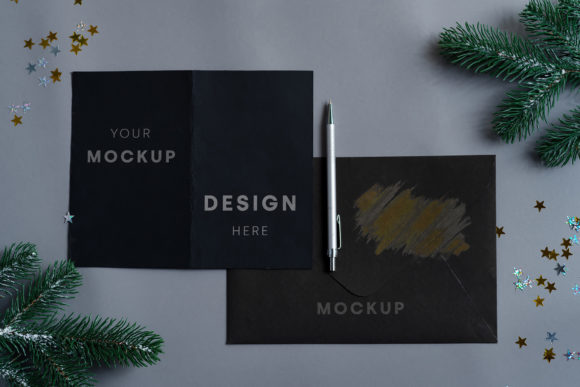
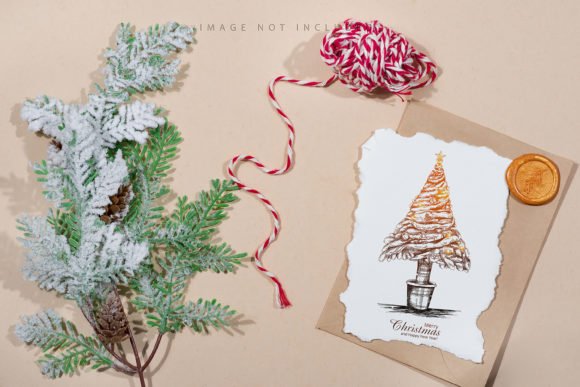
This specific mockup features a beautifully crafted envelope accompanied by a gift card and a festive fir tree, all set against a warm beige background. The aesthetic is clean, elegant, and timeless, making it suitable for a wide range of branding needs. By using this resource, designers and business owners can preview how their artwork will look in a real-world context without needing to physically print prototypes for every iteration.
Why Visualization Matters in Holiday Design
In the rush to meet December deadlines, it is easy to focus solely on the graphic elements—the fonts, the icons, the colors. However, the context in which these elements appear drastically changes how they are perceived. A bold, neon-green font might look striking on a white screen, but it could feel jarring and unprofessional when printed on a textured, cream-colored envelope intended for a luxury client.
Using a high-fidelity mockup allows you to see your design in situ. The Christmas Envelope and Card Mockup provides a neutral yet festive backdrop that lets your design take center stage while still grounding it in reality. The beige background offers warmth and sophistication, avoiding the cliché overload of red and green that can sometimes distract from the actual message. It creates a sophisticated canvas that highlights the quality of your work.
Real-World Applications for Various Industries
The versatility of this mockup extends far beyond just personal holiday cards. Several industries can leverage this asset to enhance their marketing materials and customer experience.
Retail and E-commerce
For online retailers, the unboxing experience is a crucial part of brand loyalty. Even if you are sending digital vouchers, showing customers what the physical redemption process looks like builds anticipation. Retailers can use this mockup to showcase gift cards included with holiday purchases. By placing their branded gift card design into the smart object, they can create stunning social media posts that demonstrate the premium feel of their holiday offerings. It turns a simple transaction into a memorable visual story.
Corporate Communications
Businesses often struggle to balance professionalism with seasonal cheer. Corporate communications teams need materials that reflect brand integrity while still acknowledging the holidays. This mockup is perfect for internal newsletters, employee appreciation notes, or B2B holiday greetings. The clean lines and classic composition ensure that corporate logos and messages remain legible and respectful. It helps HR departments and marketing teams produce consistent, polished materials that strengthen company culture during the festive period.
Wedding and Event Planning
Holiday weddings and end-of-year galas require exquisite stationery. Planners can use this mockup to present envelope and card concepts to clients who may not have a strong visual imagination. Seeing their chosen monogram or event details inside the envelope structure helps clients visualize the final product. It serves as a powerful sales tool, allowing planners to upsell premium stationery packages by demonstrating the potential elegance of the final output.
How to Use the Smart Object Feature Effectively
One of the standout features of this Christmas Envelope and Card Mockup is its user-friendly interface, specifically the active smart object layer. For those familiar with Adobe Photoshop, this means a streamlined workflow. You do not need to manually warp or distort your design to fit the perspective of the envelope. Instead, you simply open the smart object layer, paste your design, and save. The software handles the rest, applying your artwork seamlessly to the curved surfaces and shadows of the envelope and card.
However, precision is key. Each file includes a designated safety zone within the smart object. These are subtle guide lines that indicate the area where your design should reside to avoid being cut off or distorted by the edges of the envelope flap or the folds of the paper. Activating the layer reveals these boundaries, ensuring that critical elements like text or logos remain fully visible and undistorted. Ignoring the safety zone can lead to awkward cropping, so taking a moment to align your design correctly is worth the extra few seconds.
Technical Specifications and Quality Considerations
When selecting a mockup, resolution and format are paramount. This particular file is provided in PSD format at a high quality of 300 DPI, which is the industry standard for print-ready materials. With dimensions of 6016×4016 pixels, it offers ample detail for both web display and large-format printing. This ensures that whether you are posting a thumbnail on Instagram or printing a billboard-style advertisement, the image remains crisp and clear.
It is important to note that this is a photographic mockup, not a 3D render or vector illustration. This distinction matters because it affects how light and shadow interact with your design. The lighting is natural and soft, casting realistic shadows that give depth to the envelope and the fir tree accent. Because it is photo-based, the background color does not change dynamically; the beige tone is fixed. This stability is actually a strength, as it provides a consistent, neutral environment that won’t clash with your design colors. If you need a different background hue, you would need to composite the mockup into a new scene, but for most purposes, the beige backdrop works universally.
Common Pitfalls to Avoid
While the tool simplifies the visualization process, there are common mistakes designers make when using such assets. First, neglecting typography limitations. The mockup applies your design as-is; it does not include pre-made typography. If your design relies on complex kerning or small font sizes, test them carefully within the smart object. What looks good on a full-screen monitor might become illegible when scaled down to the size of a gift card in the mockup.
Second, overcomplicating the design. The beauty of this mockup lies in its simplicity. Adding too many elements to your design can clutter the composition, fighting against the elegant negative space of the envelope. Keep your designs clean and focused. Let the texture of the paper and the fold of the envelope add character, rather than trying to do everything through the graphic itself.
Final Thoughts on Integration
Incorporating a Christmas Envelope and Card Mockup into your holiday planning is more than just a technical step; it is a strategic move toward better communication. Whether you are a freelancer designing a portfolio piece, a marketer launching a campaign, or a small business owner sending thank-you notes, seeing your work in a realistic setting builds confidence. It bridges the gap between digital creation and physical perception.
By respecting the safety zones, utilizing the smart object capabilities, and keeping the aesthetic balance in mind, you can produce materials that resonate with your audience. The combination of the crafted envelope, the gift card, and the fir tree creates a cohesive narrative of giving and celebration. Take advantage of this high-quality resource to ensure your holiday designs are not just seen, but felt. Your attention to detail in the preparation phase will reflect positively in the reception of your final message.